Microsoft Access Services
Access-Based Inventory Tracker for Microsoft Access
Simple, Smart inventory tracking access Database for Small Businesses
If you're juggling spreadsheets or struggling to keep track of inventory manually, you're not alone. Many small manufacturers, warehouses, and fulfillment teams face the same challenge: finding a tool that’s powerful enough to handle inventory operations but simple enough to actually use. That’s where our inventory control database comes in.
Built entirely in Microsoft Access, this tool provides a clean, user-friendly interface to track stock levels, manage vendors, create purchase orders, and monitor alerts-all without needing to learn a complicated ERP system.
Why Use an MS Access Inventory Management Tool?
Microsoft Access is often overlooked, but it's a robust platform for creating custom business tools-especially for teams already using Microsoft 365. Our inventory tracker template turns Access into a complete inventory control system tailored to small-scale needs.
You can:
• View stock on hand in real-time
Instantly see current inventory levels across your product catalog, helping avoid delays, shortages, or over-ordering.
• Receive low-stock alerts before problems occur
Set minimum thresholds for each item and get notified when stock drops below critical levels-so you can reorder proactively.
• Assign vendors to specific products
Maintain supplier relationships by linking products to their preferred vendors, including contact info and custom pricing.
• Automate purchase order creation
Generate accurate POs with a few clicks-pre-filled with item details, quantities, and vendor info-to save time and reduce errors.
• Generate reports and export to Excel or PDF
Create stock reports, order summaries, and inventory audits with filter options-and export them easily for team use or archiving.
This isn’t just a tool-it’s your team’s daily command center for inventory decisions.
See the MS Access Inventory Tracker in Action
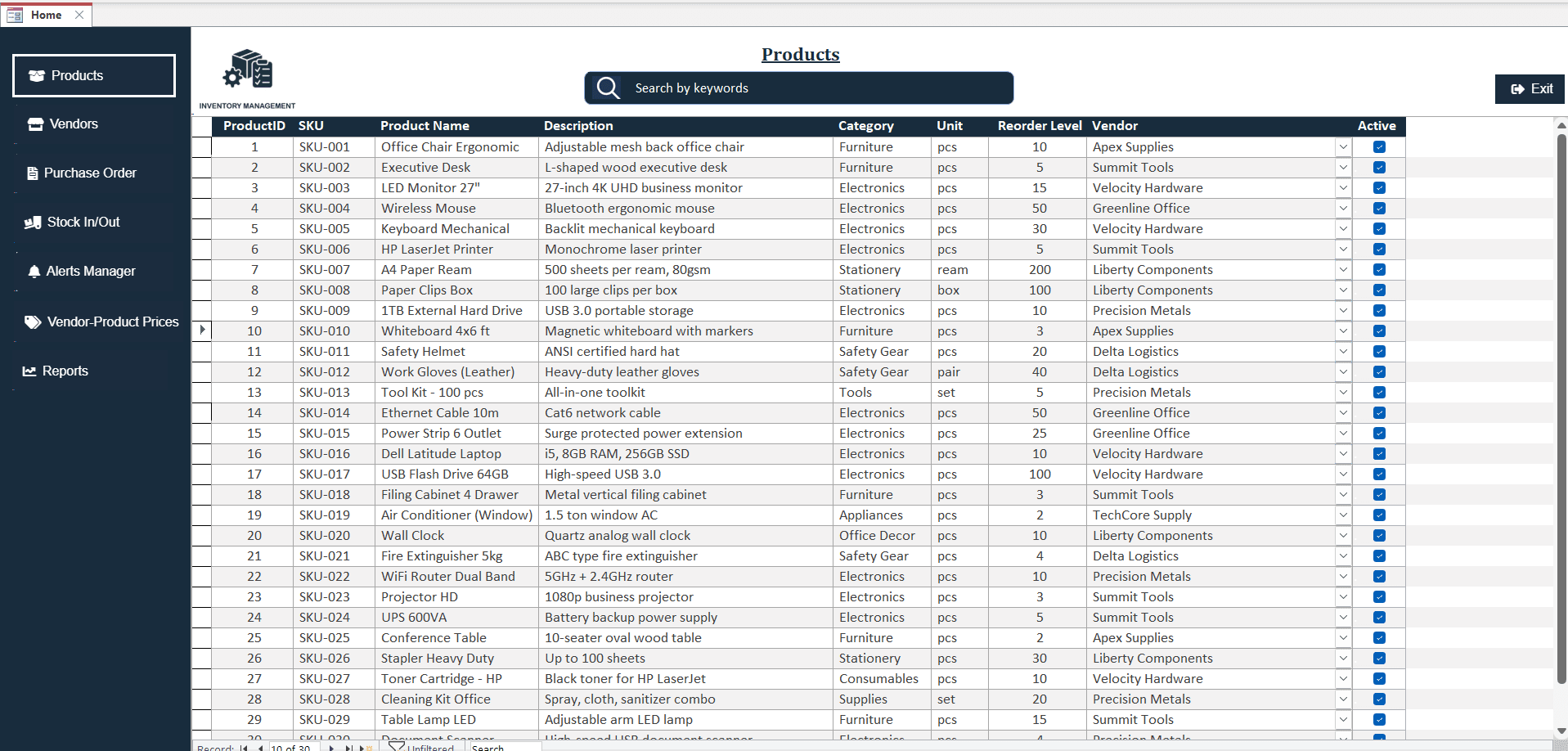
Preview actual screenshots of the database below. Scroll sideways to see more!
Key Features at a Glance
Inventory Management
• Create and manage a full product catalog
Easily build a structured list of all your products, categorized and searchable for faster reference and updates.
• Store SKU, product name, unit of measure, and category
Track every item with precise identifiers like SKU codes, naming conventions, measurement units (e.g., pcs, boxes, kg), and grouped categories.
• View live stock levels and set reorder thresholds
Monitor how much inventory is available in real-time and set minimum stock limits to automatically trigger low-stock alerts.
• Optionally track stock per location or warehouse
If you’re managing inventory across multiple locations, enable site-specific tracking to see where items are stored and how much is available at each site.
Result: Know exactly what you have, what you’re running low on, and what needs to be ordered-before it's too late.
Vendor Management
• Save supplier information (address, contact, payment terms)
Maintain a complete vendor directory with essential details like company name, mailing address, primary contact person, phone number, email, and agreed-upon payment terms.
• Link products to their preferred vendors
Assign each product to its default or preferred supplier for faster and more accurate purchase order generation.
• Customize pricing by vendor for accurate purchase orders
Define specific pricing per vendor so the system auto-fills correct rates during order creation, ensuring consistency and preventing pricing errors.
Benefit: Spend less time chasing vendor details and more time getting the right stock in on time.
Purchase Orders
• Easily create, edit, and send POs
Generate professional purchase orders in just a few clicks-select the vendor, add items, set quantities, and either print or email directly from the system.
• Track order statuses: Draft, Ordered, Received, Cancelled
Stay on top of your procurement pipeline with clear status updates. Know exactly where each PO stands and take timely action as needed.
• Auto-update inventory when items are received
Once goods are marked as received, the system automatically adjusts stock levels-removing the need for manual entry and ensuring accurate inventory counts.
Efficiency: Reduce manual updates and purchasing errors. Just point, click, and track.
Alerts & Notifications
• Automatic low stock alerts based on reorder levels
The system continuously monitors inventory and instantly notifies you when stock levels drop below your set thresholds-helping you restock before shortages occur.
• Visual cues (red/yellow indicators) for urgent items
Color-coded indicators on the dashboard make it easy to spot issues at a glance-red for critical low stock, yellow for pending orders-so you can act quickly.
• Optional expiry alerts if product lifespan tracking is enabled
For products with expiration dates, enable expiry tracking to receive timely alerts when items are nearing their shelf life-ideal for perishable or regulated goods.
Peace of Mind: Never get caught off guard. The system keeps watch so you don’t have to.
Reports & Audit Logs
• Stock summary, low inventory reports
• Purchase order history and vendor performance
• Inventory valuation and movement reports
• Built-in audit log: who changed what and when
Transparency: Make data-driven decisions, track performance, and stay accountable.
Sample Workflow: How It Works Day-to-Day
1. Admin adds new products and vendors
2. Purchasing team creates POs and sends to vendors
3. Stock manager receives items and updates inventory
4. Barcode scanner helps speed up check-ins
5. System checks for low stock and triggers alerts
6. Managers review reports for restocking and planning
In short, our Access inventory template simplifies daily operations for small teams that need to stay lean and efficient.
Who This Is For
• Small manufacturing companies
• Inventory-heavy warehouses
• Procurement teams in logistics
• Businesses transitioning from Excel to Access
If you're already using Microsoft Access, or looking for a flexible inventory tracker template that doesn’t require monthly fees or third-party platforms, this is the solution you’ve been looking for.
FAQ
Frequently Asked Questions
Find answers to common questions about our services
Get Started
Whether you're managing a few dozen SKUs or hundreds, our MS Access Based Inventory Tracker or MS Access stock tracker provides a reliable, scalable way to control your stock. It's ready to use, customizable, and backed by our expertise in building practical MS Access database tools for real-world business needs.