Microsoft Excel Services
Excel Automated Document Generator
Create, Personalize, and Distribute Client Documents in Minutes - Not Hours
Overview
The Excel Automated Document Generator is a Microsoft Office-based automation system for legal, compliance, HR, audit, and business teams that prepare templated documents at scale. By integrating Excel, Word, and Outlook with VBA, you can create documents from templates, auto-fill client data, export to DOCX/PDF, and send via Outlook - all from one place.
Instant Template Output:
Generate Word documents from approved templates without leaving Excel.
Auto-Fill from Excel:
Map client fields from your data sheets to Word placeholders/bookmarks with zero copy-paste.
One-Click Exports:
Save each document as an editable DOCX and a share-ready PDF automatically.
Outlook Integration:
Email PDFs to clients instantly or create drafts for review - your choice.
Ideal for audit reports, contracts, compliance letters, NDAs, engagement letters, and service communications - with consistent formatting and fewer errors.
Key Features
Excel Automated Document Generator - Detailed Feature Breakdown
Template Selection Dropdown
No more digging through folders. Choose the right Word template inside Excel from a clean dropdown. The tool auto-detects and lists templates from the designated folder so everyone uses the latest, approved version.
Automated Field Replacement
Eliminate manual find-and-replace. Client data stored in Excel is mapped to Word bookmarks/placeholders and injected instantly - names, dates, clauses, addresses, reference numbers, and more. This improves speed, accuracy, and compliance.
Multi-Template Support
Handle multiple document types in one system - audit reports, NDAs, contracts, compliance letters, service agreements. Add new templates by dropping them into the templates folder; they appear in the dropdown automatically.
Batch Processing
Generate documents for dozens or hundreds of clients in one pass. The tool loops through your client list, applies the correct data, and outputs personalized files without manual intervention. Perfect for law firms, HR, compliance, and franchises.
Dual Format Output
Every document is saved as DOCX (for editing) and PDF (for distribution). Keep editable masters and send tamper-resistant PDFs to clients or regulators - no extra export steps required.
Email Integration with Outlook
Attach each client’s PDF to an Outlook email with prefilled recipient, subject, and message. Use Auto-Send for immediate dispatch or Draft Mode to review first. All messages stay in Sent/Drafts for audit and record-keeping.
Scalable and Flexible
From solo consultants to enterprise teams, the system scales with your needs. Store unlimited client records, manage many templates, and run as often as needed. Customize template fields or VBA to match your workflow and compliance rules.
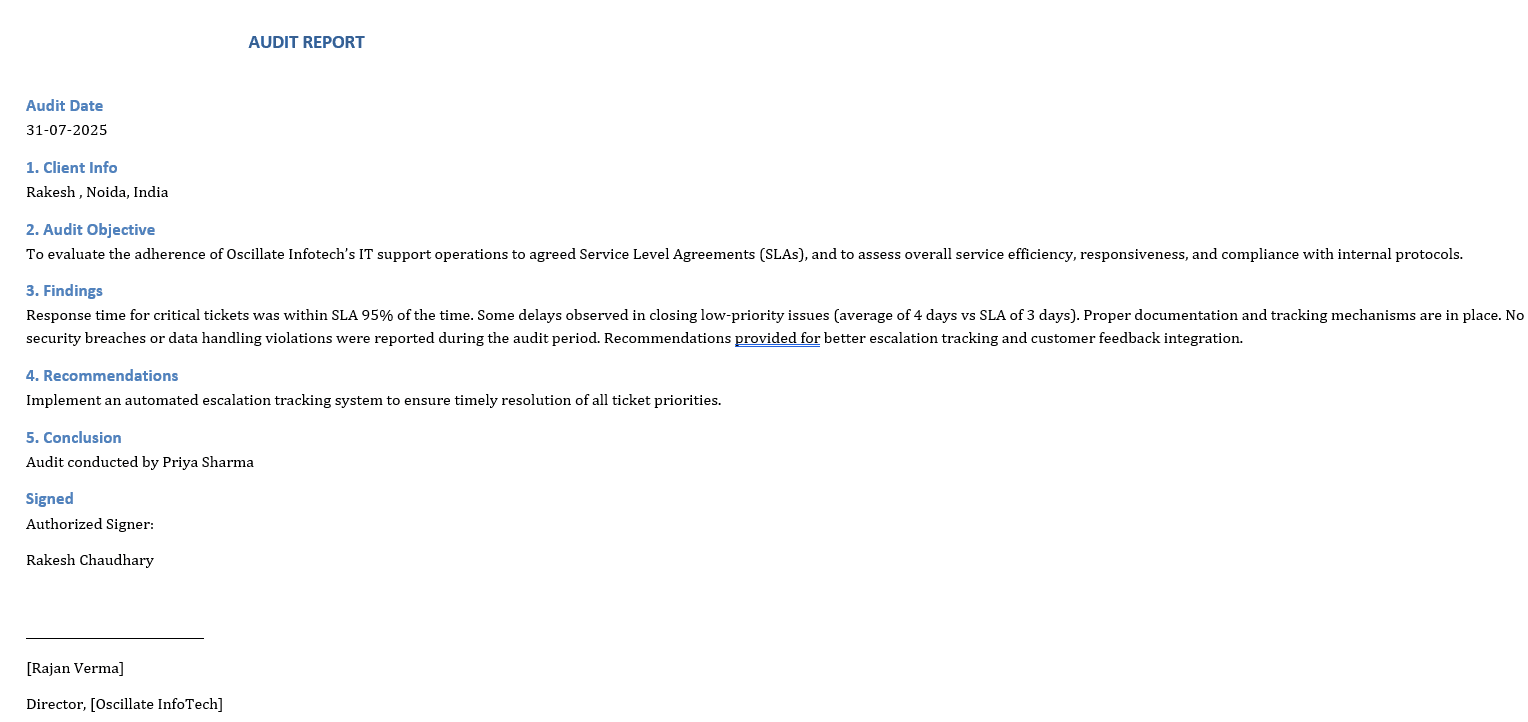
Automated Document Generator - Screenshots
Preview the main dashboard, templates, and generated outputs of the Automated Document Generator tool. Click any image to enlarge.
Why This Tool Is a Game-Changer
Manual creation, formatting, and sending can take 30-45 minutes per document. With automation, it drops to under a minute per client - with greater accuracy.
Zero Copy-Paste Mistakes:
Data is pulled directly from your master Excel sheets - no typos, no mismatched names.
Brand & Compliance Consistency:
All outputs follow approved wording, styles, and layouts.
Flexible Sending Options:
Dispatch immediately or hold drafts for manager/legal review.
Familiar Platform:
All inside Microsoft Office - no new software or logins to learn.
How It Works
1) Select a Template:
From the Setup sheet, choose the Word template you want to use.
2) Load Client Data:
The system reads field-value pairs from your Data sheet for dynamic replacement.
3) Generate for All Clients:
Loops through the Clients sheet to personalize outputs for each contact.
4) Auto-Fill Templates:
Populates Word bookmarks/placeholders with the correct client data.
5) Save & Export:
Outputs both DOCX (editable) and PDF (final) into your output folder.
6) Send via Outlook:
Attaches the PDF for each client and either sends or saves as a draft.
Clients Sheet Overview
Column A - Client Names:
Start from A2; used for document personalization (e.g., Dear {ClientName}).
Column B - Email Addresses:
Start from B2; used by Outlook integration to address emails automatically.
During generation, the ClientName is inserted into the Word template. If emailing is enabled, the PDF is sent to the corresponding address - fully automated and personalized.
Why Choose the Excel Automated Document Generator?
Saves Time:
Turn multi-day tasks into minutes with batch generation, exports, and emails.
Ensures Accuracy:
Pull data from validated Excel sources; no missed edits or stale clauses.
Simple to Use:
If you can use Excel, you can run the entire process - no training needed.
Professional Output:
Consistent formatting and branded PDFs suitable for clients and regulators.
Why Buy This Tool?
Ready to Deploy:
Ideal for legal, HR, audit, compliance, and operations teams.
Fully Customizable:
Adjust templates, fields, and logic to match your internal standards.
Reusable Across Teams:
Support multiple departments or external client engagements.
Cost-Efficient:
Reduces time and admin costs tied to document preparation and QA.
Scalable:
Supports growth without increasing headcount or software spend.
Conclusion
The Excel Automated Document Generator is more than a template filler - it’s a complete document automation system that delivers speed, accuracy, and consistency inside Microsoft Office. If your team needs fast turnaround, zero errors, and professional output at scale, this tool will transform your workflow. For customization or support: contact@excelaccessexpert.com